Thursday, July 13, 2017

Bash Script to Run Multiple Commands in Different Tabs

Running Multiple Commands in Different Command Line Tabs


This small tutorial is directed at people that still have to do a lot of initial setup every time they reboot your Linux machine and are looking for some automation, with a simple bash script.
Creating a bash script to run multiple commands isn't really a hard task. I wrote some articles before about this here and here.
The tricky part was that I wanted some of those commands to run in different tabs so I can easily access the outputs for debugging purposes (like Docker containers, log monitoring, etc…).
I also didn’t want to go to the trouble of installing and configuring tools like tmux or tmuxifier (if you want something more advanced, definitely check them out!) for such a simple task like launching a few command line tabs. So, I decided to do some research and I found that the solution is rather simple if your Linux machine has gnome-terminal installed.


Saturday, February 4, 2017

Speed Up WordPress in 8 Actionable Steps


"Since nowadays, speed and performance are kings when it comes to SEO and user engagement (search for “page load time impact” on google, just don’t try to read everything because you will be overwhelmed), I decided to take a look on how to speed up my blog. Turns out that, with the right set of plugins and tools, it actually pretty easy to achieve a decent amount of performance improvement. In my case around 300% faster."
- quoted from joaoperibeiro.com

The website in this article went from 7 seconds load page time to less than 2 seconds and a 86 Points on YSlow (Grade B) to 95 Points on YSlow (Grade A) on “Small Site or Blog”.

All of this improvement in your WordPress by following this 8 actionable steps:


1. Optimize Media with Imagify or WP SmushIt

2. Lazy Load Images with Lazy Load plugin

3. Minify and Merge JavaScript and CSS using Fast Velocity Minify or WP Super Minify

4. Analyze Your WordPress Plugins P3 Profiler

5. Optimize the Database with WP-Optimize

6. Cache Content using WP Super Cache or W3 Total Cache and Far Future Expiry Header

7. Use Cloudflare

8. Use Nginx with PHP 7 and OPCache


Check out the full original article, with detailed information about each step, here.

Monday, January 2, 2017

Laravel PHP Framework - Year 2016 in Review

Laravel News just released a year review of the top articles, tutorials, packages and resources of the Laravel Framework during 2016.

If you are a Laravel user (or just thinking about being), you differently should check this out. If 80 is too much for you to go through, I leave you here my Top 5.

My Personal Top 5 From Laravel in 2016:


Congratulations to Laravel community for all this new packages and resources.


Bonus Laravel Resources:


If you're not yet a Laravel user (or starting now), this next post has a list of links and resources to learn and get good with Laravel 5.


Curious to see what Laravel will bring us in 2017.

Happy coding!

Friday, December 2, 2016

PHP 7.1 Released - Nullable types, Void Return Type, Class Constant Visibility and more

The PHP development team announced yesterday the release of PHP 7.1.0. This release is the first point release in the 7.x series.


The list of changes contains:
"-Nullable types

function answer(): ?int  {
    return null; //ok
}
 
function answer(): ?int  {
    return 42; // ok
}
 
function answer(): ?int {
    return new stdclass(); // error
}
- Void return type
function lacks_return(): void {
    // valid
}
function should_return_nothing(): void {
    return 1; // Fatal error: A void function must not return a value
}
- Class constant visibility modifiers
<?php
 
class Token {
 // Constants default to public
 const PUBLIC_CONST = 0;
 
        // Constants then also can have a defined visibility
        private const PRIVATE_CONST = 0;
        protected const PROTECTED_CONST = 0;
        public const PUBLIC_CONST_TWO = 0;
 
        //Constants can only have one visibility declaration list
        private const FOO = 1, BAR = 2;
}
- Iterable pseudo-type
- Square bracket syntax for list() and the ability to specify keys in list() 
- Catching multiple exceptions types
- And many more features and changes…"
Quoted from: http://php.net/releases/7_1_0.php

Saturday, November 26, 2016

Reviews of Top Frameworks For HTML5 Hybrid Mobile Apps


Technology moves so fast now a days, and this is specially true in the JavaScript world. So if you're starting now in  Hybrid Mobile development and you're looking for a Framework, you will come face to face with dozens of choices (that at first look, they all look the same).

One good place to start is by checking comparisons and reviews of the top Frameworks available for Hybrid Mobile Apps development and see which one most fits your needs.

I leave you here some good blog posts about it:


My Top 3 are Ionic Framework, Framework7 and Onsen UI. And yours?

Sunday, November 20, 2016

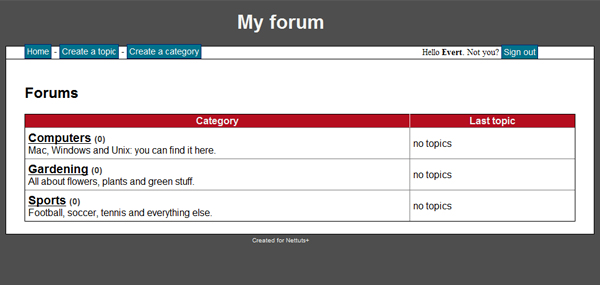
Create a Forum From Scratch with PHP/MySQL [Tutorial]


If you're looking to start or just improving your programming skills with PHP and MySQL this tutorial from Envato Tuts+ is a good place to start like they reference on the beginning of the tutorial:
"In this tutorial, we're going to build a PHP/MySQL powered forum from scratch. This tutorial is perfect for getting used to basic PHP and database usage."
- From: How to Create a PHP/MySQL Powered Forum From Scratch
And in 12 easy steps they cover all the basic functionalities of a forum:

- Creating MySQL Database Tables
- Forum "Design" with Header/Footer System
- User Sing Up, Authentication and User Levels
- CRUD of Categories, Topics and Replies

That will look more or less like the image bellow:


Tuesday, October 20, 2015

Shell script to run multiple programs in Linux

"Recently, I had a situation where I needed to execute multiple programs in Linux at the same time while redirecting their outputs to separated log files and wait for them to finish.
If you ever need to do something like that, I leave year the script that I used to accomplish that task:"

#!/bin/bash
 
# Add the full path processes to run to the array
PROCESSES_TO_RUN=("/home/joao/Code/test/prog_1/prog1" \
                  "/home/joao/Code/test/prog_2/prog2")
# You can keep adding processes to the array...
 
for i in ${PROCESSES_TO_RUN[@]}; do
    ${i%/*}/./${i##*/} > ${i}.log 2>&1 &
    # ${i%/*} -> Get folder name until the /
    # ${i##*/} -> Get the filename after the /
done
 
# Wait for the processes to finish
wait
 
Post source:  http://joaoperibeiro.com/execute-multiple-programs-and-redirect-their-outputs-linux/


Friday, March 30, 2012

Scroll page with javascript

Sometimes it's useful to scroll the page automatically to send users to certain parts of the page. To do that the easiest way is using javascript, more specifically jquery that is a javascript framework.

Test it here:

Scroll down!
 
Example code:

<html>
<head>
<SCRIPT LANGUAGE="JavaScript" 
SRC="https://ajax.googleapis.com/ajax/libs/jquery/1.7.1/jquery.min.js">
</SCRIPT>
<SCRIPT LANGUAGE="JavaScript">
function scroll_up()
{
    $(window).scrollTop(0);
}
function scroll_to_last_div()
{
    $(window).scrollTop($('#last_div').offset().top);
}
</SCRIPT>
</head>
<body>
<center>
<div style="height:100px;width:400px;">
<br><br>
<a href="javascript:scroll_to_last_div();">Scroll to last div!</a>
</div>
<div style="height:600px;width:400px;background:#234a34;">
</div>
<div style="height:100px;width:400px;" id="last_div">
<br><br>
<a href="javascript:scroll_up();">Scroll to top!</a>
</div>
<div style="height:600px;width:400px;background:#fa342a;">
</div>
</center>
</body>
</html> 

Monday, March 19, 2012

Insert one or multiple rows in mysql db using php

Normally, one of the first thing that you need to do after connect to a mysql database is insert data. This tutorial is about inserting a single row or multiple rows into a mysql database using php. If you don't know how to connect to a database check our previous tutorial "Connect to a mysql database using php".

Let's imagine for this example that my table name is "people" and inside this table i have 3 columns "id", "first_name" and " last_name".

This way to insert a single row with the person "Chuck Norris" i need to execute the following query:

$validation = mysql_query("INSERT INTO platform_types 
                         (id, first_name, last_name) 
                         VALUES ('1', 'Chuck', 'Norris')"
                         ,$db_con);

if (!$validation) //test query for errors 
{
    echo("Error in query: " . mysql_errno($apbl_db_con) . ": " 
    . mysql_error($apbl_db_con) . '
');             
}
//Closing connection (don't forget to close the connection 
//when you don't need to query stuff to the db)
apbl_db_close($apbl_db_con); 

The $db_con variable is the one returned by mysql_connect when you connect to the database. If you need to insert multiple rows at same time the procedure is the same but you add more values at the end like this:

$validation = mysql_query("INSERT INTO platform_types 
    (id, first_name, last_name) VALUES 
    ('1', 'Chuck', 'Norris'), 
    ('2', 'Jackie', 'Chan')",$db_con);

//...the rest of the code it's the same.
 Notice that if your "id" column is set to auto-increment (usually is) you don't need to give a value to the "id" in the query because it will auto-increment by him self. Then your query will look like this:

$validation = mysql_query("INSERT INTO platform_types 
    (first_name, last_name) VALUES 
    ('Chuck', 'Norris'), 
    ('Jackie', 'Chan')",$db_con);

//...the rest of the code it's the same.

Thursday, March 15, 2012

Connect to a mysql database using php

In almost all web projects now a days you need to use at least one database to store information. So let's start using a database! First step is to connect to the database.
For this example let's imagine that a i have mysql running on the adress "localhost" with the username "root" and password "password". The database name is "mydatabase".

With this information we can start coding our php script to connect with the database.


I hope it has been helpful, in the next tutorial let's see how to insert data on your  mysql database using php.

        
//Try to connect to database
$con = mysql_connect('localhost','root','password'); 
      
if (!$con) //Test if connection was successfully
{
    echo ('Error on connect: ' . mysql_errno() . ": " 
    . mysql_error());
}
else
{
    //Connect to the table inside the database
    $db_check = mysql_select_db('mydatabase', $con); 
    if (!$db_check)
    {
        echo ('Error on the database : ' . mysql_errno() 
        . ": " . mysql_error());
    }
}

Next tutorial:  "Insert one or multiple rows in mysql db using php".

Sunday, March 11, 2012

ShutItDown RBS Review

Following my last post about licensing free and open source software, today i will review on of my applications that i just released for free under the GNU GPL v3 license. Both the application and the code written in Visual Basic are available to download.

ShutItDown RBS


ShutItDown RBS is a software that allows the user to schedule task like shut down, restart or log off on his machine. You can specify date and time and even specify if you want them to repeat every day or every week.

Features:
  • Quickly shut down, restart or log off your pc.
  • Schedule shut down, restart or log off tasks in your pc.
  • Able to run minimized and start automatically with windows.
  • You can schedule daily or weekly tasks and they will be performed automatically until you disable them.
  • Automatically generated log of ShutItDown activities so that you can check if certain tasks were performed.


shutitdown free and open source


User guide video:


This software was already approved in several websites like softpedia.com, freewarefiles.com, majorgeeks.com and soft82.com.

So if you are into programming and sometimes you develop some applications, why not share them with world?


Links:
ShutItDown RBS website 
ShutItDown RBS sourceforge project

Tuesday, March 6, 2012

How to license your free software with GNU GPL v3

As you all know a software license is something that tells the users what they can or cannot do with that especific software and it's also a way of giving some credit to the author for his software.

There are several types of licenses:

- Perpetual license
- Subscription license
- Freeware license
- Shareware license
- OEM (original equipment manufacturer)
- Educational or Academic Software
- Not for Resale (NFR) Software License
- And more...

This post is specifically about Freeware Licences and specially about Open Source because, as you already know, inside free software applications we have some that are open source and others that are closed source.

So let's see a little bit more about free and open source software (quoting Wikipedia.org):
A primary consequence of the free software form of licensing is that acceptance of the license is essentially optional — the end-user may use, study, and privately modify the software without accepting the license. However, if the user wishes to exercise the right of redistributing the software, then the end-user must accept, and be bound by, the software license.
Free and open-source licenses generally fall under two categories: Those with the aim to have minimal requirements about how the software can be redistributed (permissive licenses), and those that aim to preserve the freedoms that is given to the users by ensuring that all subsequent users recives those rights (copyleft Licenses).
An example of a copyleft free software license is the GNU General Public License (GPL). This license is aimed at giving all user unlimited freedom to use, study, and privately modify the software, and if the user adheres to the terms and conditions of GPL, freedom to redistribute the software or any modifications to it. For instance, any modifications made and redistributed by the end-user must include the source code for these, and the license of any derivative work must not put any additional restrictions beyond what GPL allows.[1]
Examples of permissive free software licenses are the BSD license and the MIT license, which give unlimited permission to use, study, and privately modify the software, and includes only minimal requirements on redistribution. This gives a user the permission to take the code and use it as part of closed-source software or software released under a proprietary software license.

free and open source license GPL


One of the most known and used license for this type of software is the GNU GPL(General Public License) that is now on version 3. The bases of this license, quoting gnu.org, are:

The Foundations of the GPL

Nobody should be restricted by the software they use. There are four freedoms that every user should have:
  • the freedom to use the software for any purpose,
  • the freedom to change the software to suit your needs,
  • the freedom to share the software with your friends and neighbors, and
  • the freedom to share the changes you make.
When a program offers users all of these freedoms, we call it free software.
Developers who write software can release it under the terms of the GNU GPL. When they do, it will be free software and stay free software, no matter who changes or distributes the program. We call this copyleft: the software is copyrighted, but instead of using those rights to restrict users like proprietary software does, we use them to ensure that every user has freedom.
So if you developed a software and you are thinking about distributing it as a free software, i created a little video explaning what you need to do to license your software with GNU GPL v3. I am not an expert on this but i have already done this and i am just trying to share my experience.

Video turorial:


Sunday, February 26, 2012

Read a file line by line to the end in VB.NET

This tutorial it's about reading a file line by line until the end in VB.NET. This is usefull, for instance, if you are using this file as a settings file and you inserted one setting per line then you can read them by order.

Visual Studio screenshot:


Code:


Imports System.IO
Public Class Form1
    Private Sub Button1_Click(ByVal sender As System.Object, ByVal e As System.EventArgs) Handles Button1.Click
        Dim file_dir As String = "file.txt"
        'parse file
        Try
            Dim sr As StreamReader = New StreamReader(file_dir)
            Do Until sr.EndOfStream
                TextBox1.Text += vbNewLine + sr.ReadLine()
            Loop
            sr.Close()
        Catch ex As Exception
            MessageBox.Show(ex.Message)
        End Try
    End Sub
End Class

In this case you are reading and adding each line to a textbox but you can read this to a string array and keep the information to work with later. It's also important to use try catch because if the file doesn't exist or you don't have permissions to read it will not crash the application.

Monday, February 20, 2012

VB.NET Write data to XML using a DataSet


In this tutorial i will talk about getting the name of all the files (in this case images) in a directory and store them into a XML file using a DataSet in VB.NET.


Code:
Imports System.IO

Public Class Form1
    Dim images_dir As String = "C:\myfolder"
    Dim xml_dir As String = "C:\myfolder"
    Dim image_list As String()

    Private Sub Form1_Load(ByVal sender As System.Object, ByVal e As System.EventArgs) Handles MyBase.Load

    End Sub

    Private Sub Button1_Click(ByVal sender As System.Object, ByVal e As System.EventArgs) Handles Button1.Click
        DataSet_images.Tables("Table1").Clear()
        image_list = Directory.GetFiles(images_dir)
        Dim filename As String
        Dim counter As Integer
        For Each filename In image_list
            counter += 1
            DataSet_images.Tables("Table1").Rows.Add(New Object() {counter, filename})
        Next filename
        DataSet_images.Tables("Table1").WriteXml(xml_dir + "\images.xml", XmlWriteMode.IgnoreSchema)
    End Sub
End Class
Video Tutorial:


Sunday, February 12, 2012

VB.NET Limit textbox minimum and maximum characters

Let's imagine that you hava a textbox for a user to input something and you want that to be between a minimum and a maximum number of characters, how you do it on VB.NET? Let's see!

Code:

Maximum size limitation can be done in the textbox properties in the "MaxLenght" option.

textbox vb.net
To minimum size limitation it's only necessary to check when user clicks the button to send that information.

    Private Sub Button1_Click(ByVal sender As System.Object, ByVal e As System.EventArgs) Handles Button1.Click
        check_text()
    End Sub

    Private Sub check_text()
        If TextBox1.Text.Length = 3 Then
            MessageBox.Show("Ok")
        Else
            MessageBox.Show("You need to insert 3 numbers")
        End If
    End Sub


Video tutorial:


Monday, February 6, 2012

Textbox for numbers only VB.NET

Sometimes we need to limit our user inputs to only numbers for instance in a quantity input and for that i leave here a tutorial on how to do that in VB.NET.

Code:

Public Class Form1    Private Sub TextBox1_KeyPress(ByVal sender As Object, ByVal e As System.Windows.Forms.KeyPressEventArgs) Handles TextBox1.KeyPress
        If (Asc(e.KeyChar) >= 48 And Asc(e.KeyChar) <= 57) Or Asc(e.KeyChar) = 8 Then
            e.Handled = False
        Else
            e.Handled = True
        End If
    End Sub


End Class


Video tutorial:


Friday, January 27, 2012

Checking if a directory exists and creating one in VB.NET

This tutorial contains you the necessary code to check if a directory exists and to create one if it returns false using VB.NET.

Code:

Imports System.IO


If Directory.Exists("c:\mydir") Then
        MessageBox.Show("Directory exists!")
Else
        Directory.CreateDirectory("c:\mydir")

        MessageBox.Show("Directory created!")
End If

Thursday, January 26, 2012

Minimize a VB.NET application to system tray using NotifyIcon

This tutorial is about using the NotifyIcon in VB.NET to minimize your application o the system tray that can be very usefull in applications that run as a server in background for instance.

Form screenshot:

VB.NET Form

Code:

Public Class Form1

    Private Sub Form1_Load(ByVal sender As System.Object, ByVal e As System.EventArgs) Handles MyBase.Load

    End Sub

    Private Sub Form1_Resize(ByVal sender As Object, ByVal e As System.EventArgs) Handles Me.Resize
        Try
            If Me.WindowState = FormWindowState.Minimized Then
                Me.Visible = False
                NotifyIcon1.Visible = True
                NotifyIcon1.ShowBalloonTip(1, "NotifyIcon", "Running Minimized", ToolTipIcon.Info)
            End If
        Catch ex As Exception
            MsgBox(ex.Message)
        End Try
    End Sub

    Private Sub NotifyIcon1_MouseDoubleClick(ByVal sender As System.Object, ByVal e As System.Windows.Forms.MouseEventArgs) Handles NotifyIcon1.MouseDoubleClick
        Try
            Me.Visible = True
            Me.WindowState = FormWindowState.Normal
            NotifyIcon1.Visible = False
        Catch ex As Exception
            MsgBox(ex.Message)
        End Try
    End Sub

    Private Sub OpenToolStripMenuItem_Click(ByVal sender As System.Object, ByVal e As System.EventArgs) Handles OpenToolStripMenuItem.Click
        Try
            Me.Visible = True
            Me.WindowState = FormWindowState.Normal
            NotifyIcon1.Visible = False
        Catch ex As Exception
            MsgBox(ex.Message)
        End Try
    End Sub

    Private Sub ExitToolStripMenuItem_Click(ByVal sender As System.Object, ByVal e As System.EventArgs) Handles ExitToolStripMenuItem.Click
        Me.Close()
    End Sub
End Class


Video Tutorial:

Saturday, January 21, 2012

For Loop VB.NET / C#

This time i leave another very usefull loop, the "For Loop", in both VB.NET and C#.
Enjoy.


C#:
  for (int i = 0; i <= 5; i++)
  {
     //Do your code here
  }


VB.NET:
  Dim i As Integer
  For i = 0 To 5
      'Do your code here
  Next i